Product Updates
November 30, 2026
Update #31: 15 upgrades to the Dubly API
The Dubly API has learned 15 new things. Twelve of them take a dub from the first link to the finished file, so the editing you know from the app now works through the API as well. Two make the API easy to pick up for developers and AI agents, and one connects your translation styles to the systems where your terminology already lives.
What's new
- Five for editing. Correct segments, apply your changes and follow the render, edit the timeline, re-voice a single segment, and switch lip sync on or off block by block
- Four for finished dubs. Burn in subtitles, fetch every file of a language, rename dubs or move them into a project, and delete them
- Three for everyday use. Start dubs from Google Drive, follow the status “Updating” with links to the latest version, and use every language in every account
- Two for developers and AI agents. Public docs with a playground and code examples, plus llms.txt, openapi.json and a docs MCP server
- One for your terminology. Import and export your translation styles through the API
1. For AI agents and automations
A token from your account is all it takes, whether the requests come from your own code, an automation in n8n or Make, or an AI agent like Claude, Cursor or ChatGPT. You don't need a plugin or an MCP server of your own. The API is plain HTTPS with JSON, and every request carries your token as a bearer token.
For agents, the documentation now offers three public entry points. None of them needs a login.
- llms.txt lists every page of the docs as Markdown. llms-full.txt holds the whole documentation in one file.
- openapi.json is the OpenAPI 3.1 specification of the whole API, for your API client or as a tool definition for your agent.
- The docs MCP server at
https://docs.dubly.ai/mcplets MCP clients such as Claude Code search the documentation. It only reads the docs and doesn't start dubs. The dubbing itself always runs through the API with your token.
Tell an agent something like “Dub our new product video into German and French, with lip sync, and save the files to ./exports.” and it works through the job on its own. It reads the docs, starts the dub from the video's YouTube link, checks the status until it reads “Dubbed”, starts lip sync for each language, waits for “Synced” and downloads the videos.
In n8n or Make, every call to Dubly is an ordinary HTTP request step. A typical workflow starts a dub when a new video comes in, checks the status at intervals until it reads “Dubbed”, then fetches the files and passes them on to your storage, your LMS or your editing team. The Quickstart walks you through your first dub, from creating the token to downloading the result.
2. From link to finished file
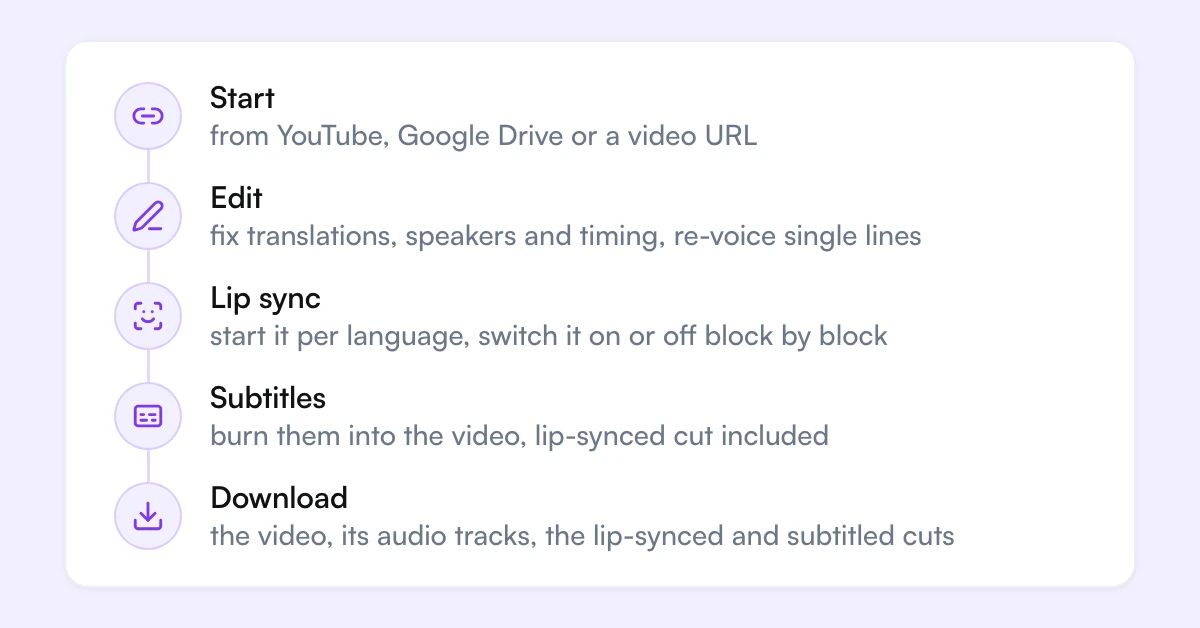
Twelve upgrades take a dub from start to finish. What you fix in the editor, a script or an agent can now fix for you, from a product name in every language to the timing of a single sentence. All paths below are relative to https://app.dubly.ai.
Start dubs
- From Google Drive.
POST /api/v1/dubs/google-drivestarts a dub from a single video file in Google Drive. Share the file with “Anyone with the link” and leave downloading allowed. It works with single files, not folders. YouTube links (POST /api/v1/dubs/youtube) and public video URLs (POST /api/v1/dubs/url) work as before. - Every language in every account.
target_languagesaccepts every language code of the standard engine, in every account. The supported target languages page lists them for each engine.
Correct and re-render
- Read and correct segments.
GET /api/v1/dubs/{id}/segmentsreturns every segment of a language with its start and end, source text, translation and speaker.PATCH /api/v1/dubs/{id}/segmentscorrects the source text, translation or speaker of up to 500 segments in one call. Withalso_retranslate_languages, a corrected source text is translated again into the other languages you list. - Apply your changes and follow the render.
POST /api/v1/dubs/{id}/updateapplies your edits for one or more languages, like “Update” in the editor.GET /api/v1/dubs/{id}/updateshows how far the render has got, from voice cloning to the final rendering, and returns the new video link once it's done. - Edit the timeline.
POST /api/v1/dubs/{id}/segments/timelineworks like saving in the Visual Editor. Move segments, shorten or lengthen them, set their pace between 0.7 and 1.3, change their text or speaker, split them, add new ones or delete them, with up to 500 entries per call. This works with the standard engine. - Re-voice a single segment.
POST /api/v1/dubs/{id}/segments/{segmentId}/regeneratere-voices one segment right away, like “Regenerate segment” in the Visual Editor. This works with the standard engine.
Lip sync and subtitles
- Lip sync block by block.
GET /api/v1/dubs/{id}/lipsync/segmentslists the lip sync blocks of a language, andPATCHon the same path switches them on or off. Dubly then reassembles the lip-synced video from the parts it already has, without a new lip sync run and without credits. This works with the standard engine for seven days after the lip sync run. Starting lip sync itself (POST /api/v1/dubs/{id}/lipsync) costs one credit per video minute, as before. - Burn in subtitles.
POST /api/v1/dubs/{id}/subtitled-videoburns subtitles into the video of one language, in the “Business” or “Social” style and with an optional accent color. Once lip sync for that language is finished, the lip-synced video is the base.GETon the same path shows the progress and gives you the download.
Files and housekeeping
- Every file of a language.
GET /api/v1/dubs/{id}/downloadsreturns the same files the “Download” tab offers, from the video and the full audio to voice and background as separate tracks, the lip-synced video and the subtitled video. Each download link is valid for one hour. - Rename and move.
PATCH /api/v1/dubs/{id}renames a dub, moves it into a project, or both.GET /api/v1/projectsgives you the project IDs. - Delete.
DELETE /api/v1/dubs/{id}deletes a dub with all its languages and files. This is permanent.
Status and links
- “Updating” and links to the latest version.
GET /api/v1/dubs/{id}reports “Updating” while a language re-renders after an update, and “Dubbed” with one link per language once it's done. These links always lead to the latest version and stay valid for seven days.
Apart from creating a dub and starting lip sync, none of these calls costs credits.
3. Translation styles via API
Under “Translation Style” in the sidebar, Dubly keeps your terminology in three lists, “Don't Translate”, “Define Translations” and “Pronunciations”. You can now import and export these lists through the API. That keeps your translation styles in step with your own term base, your agency's list or any other system where your terminology lives, without anyone moving files back and forth by hand.
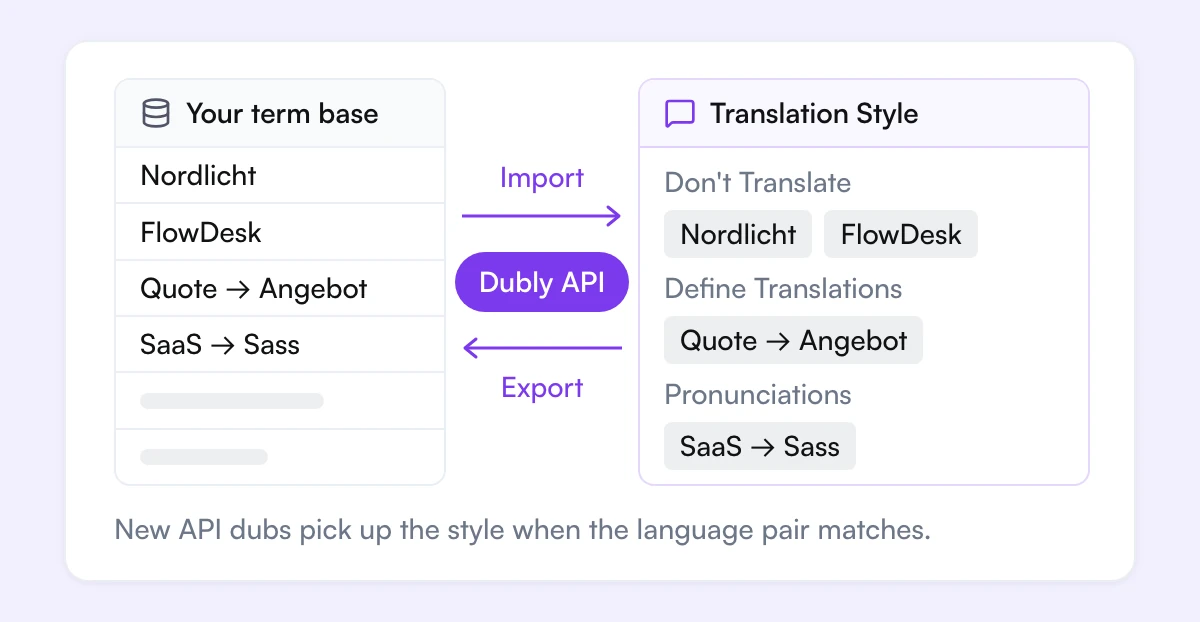
When you create a dub through the API, Dubly applies the translation style of your account that matches the source and target language (auto_apply_styles, on by default). With translation_style_map, you assign a specific style to each target language instead.
In the app, you can import and export the same three lists as Excel, CSV or text files, as described in Update #29.
4. Docs, playground and token
The API documentation is public at docs.dubly.ai, without a login. Under “Guides” you'll find the quickstart, authentication, the dub status lifecycle, errors, edit limits and the supported languages. “API Reference” covers every endpoint with code examples in cURL, JavaScript and Python, and its playground sends requests straight from the page.
The API is included in every paid plan at no extra cost. Dubs you create through it are billed in credits, by video length and target language.
Create a token
In the Dubly app, open “Settings” and switch to the “API” tab. Click “Generate new token”, give the token a name and click “Generate”. Copy it right away, because it is shown only once. Owners and admins of an account can create tokens.
Open the docs
Start with the Quickstart on docs.dubly.ai. Every request sends your token in the Authorization header as a bearer token. If you work with an AI agent, point it to https://docs.dubly.ai/llms.txt and give it the token.
Start your first dub
Send a YouTube link, a Google Drive file or a video URL together with the language of the video and your target languages. The answer contains the ID of the new dub. Ask for its status until it reads “Dubbed”, then download the result.
What teams build with the API, from automated course videos to whole YouTube channels, is on our AI dubbing API page.
5. Good to know
- Status checks. Dubly doesn't call your system when a dub is done. Your code or workflow asks for the status at intervals until it reads “Dubbed”, or “Synced” for lip sync.
- Editing costs no credits and has a fixed allowance. Corrections, timeline edits, re-voicing, applying changes, lip sync blocks, subtitles, downloads and renaming, moving or deleting dubs cost no credits. Because each edit still takes voice and rendering time on our side, the API allows two edits per segment (corrections, timeline saves and re-voicing share this count), two updates per language, two lip sync block changes per language and two subtitle renders per language. Every answer shows how many are left. Edits in the app don't count and are never blocked. The edit limits page has the details.
- Standard engine. Timeline edits, re-voicing single segments and lip sync blocks work with the standard engine. For dubs made with our second engine, which is only enabled for some accounts, the API declines these three calls.
- Lip sync blocks for seven days. Dubly keeps the lip sync parts for seven days after the run. After that, changing blocks needs a new lip sync run, which costs credits.
- Links expire. Result links from the status call stay valid for seven days, download links for one hour. Save the files rather than the links.
- Deleting is permanent. A dub deleted through the API can't be restored.
- The playground is live. Requests from the playground are real. A dub you start there lands in your account and uses credits.
- Docs in English. The documentation is available in English.
- A token opens your account. A token works for the whole account until you revoke it, so share it only with people and tools you trust. You can revoke any token on the “API” tab with “Revoke”.
Tell us what you're building
If you're automating your dubbing, or an endpoint you need is missing, message us in the app chat or reply to the newsletter. Planning a larger integration? Reply as well, and we'll set up a call.
Try it on your next video
Edit finished dubs through the API, from segments to the timeline
Burn in subtitles and fetch every file, at no credit cost
Public docs with a playground, llms.txt and a docs MCP server