AI Lip Sync
June 11, 2026
How AI Lip Sync Works: The Step-by-Step Process Behind Natural-Looking Dubbed Video
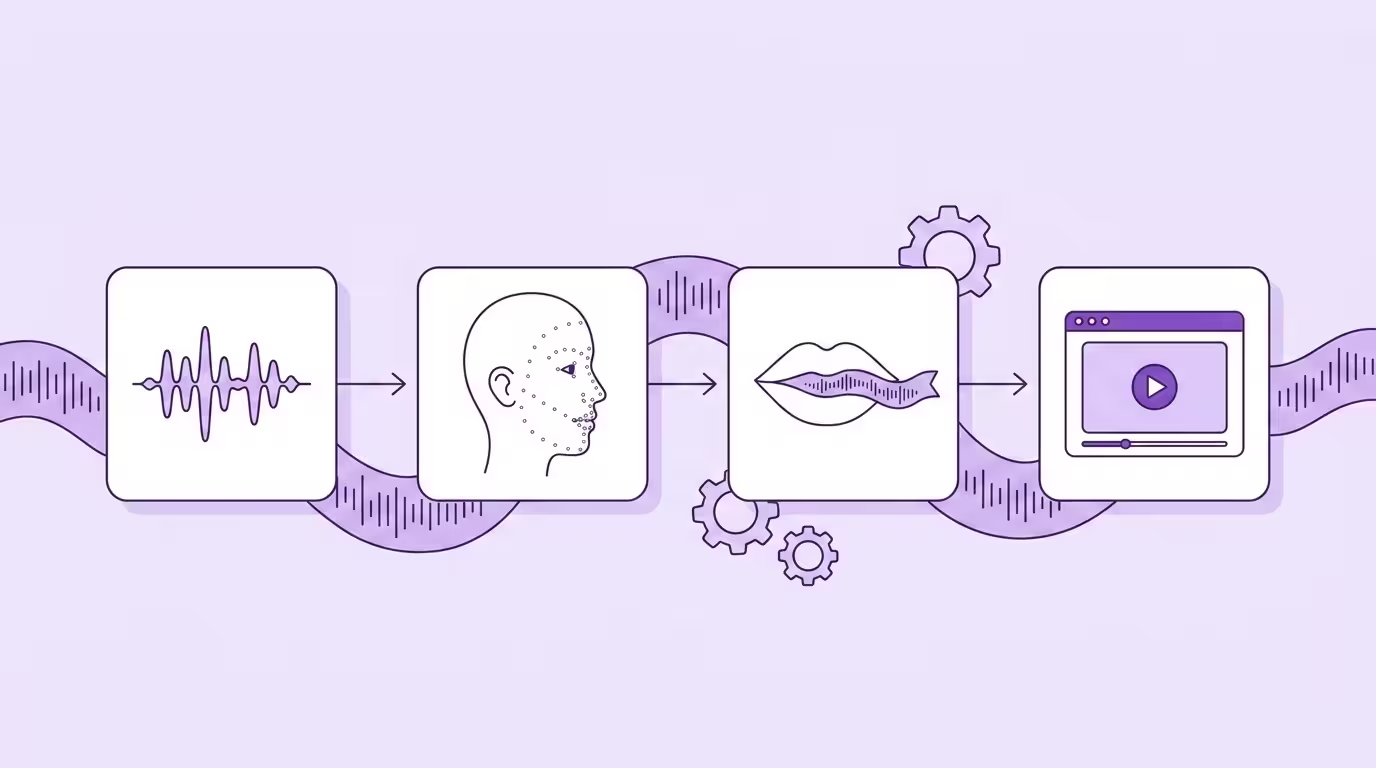
AI lip sync works by analyzing dubbed audio and generating new video frames where the speaker's mouth matches the translated words — naturally, in real time, without touching anything else on screen. The speaker's expressions, head movements, skin texture — all preserved. Only the lip area changes.
That sounds straightforward. The engineering behind it isn't. Getting lips to look natural in a different language requires solving five problems simultaneously — and most tools on the market don't solve all of them. Some don't even try.
Here's the actual process, step by step. What happens under the hood, what can go wrong, and what Lip Sync 2.0 does differently.
Key Takeaways
- AI lip sync analyzes dubbed audio for phonemes, maps the speaker's face, then generates new mouth positions frame by frame
- Temporal smoothing creates natural movement between positions — the difference between convincing and uncanny
- Multi-speaker handling requires persistent identity tracking across frames, not just face detection
- Real-world conditions (occlusion, movement, lighting changes) are where most tools fail and Lip Sync 2.0 differentiates
- Processing takes ~2 minutes per minute of video, with parallel language processing
Where Lip Sync Fits in the Dubbing Pipeline
Lip sync is the final stage. It can't happen first — it needs the dubbed audio to exist before it can match the video to it.
The full pipeline:
Speech recognition
transcribe the original audio, identify speakers
Neural translation
translate the transcript into the target language
Voice cloning
generate the translated audio in the original speaker's voice
Lip sync
adjust the speaker's mouth in the video to match the new audio
Steps 1-3 produce a dubbed audio track. Step 4 makes the video match. Without step 4, you have a video where the speaker sounds right but looks wrong. With it, the speaker looks and sounds like they filmed in the target language.
The audio side of this pipeline: AI Dubbing — Complete Guide
Step 1 — Audio Analysis
The process starts with the dubbed audio track — the voice-cloned version in the target language. The lip sync system doesn't need to understand what's being said. It needs to understand what the mouth should look like.
The audio gets broken down into phonemes — individual speech sounds. Each phoneme maps to a viseme — a visual mouth shape. "M" closes the lips. "AH" opens wide. "EE" stretches horizontally. The system creates a timeline: at 0.0 seconds, this viseme. At 0.1 seconds, this one. At 0.15 seconds, transitioning between these two.
But it's not just about individual sounds. Real speech overlaps — your mouth starts forming the next sound before the current one finishes. The AI models this coarticulation, producing a continuous flow of lip shapes rather than a sequence of discrete positions. That's why the result looks natural instead of robotic.
Step 2 — Face Detection and Mapping
While the audio gets analyzed, the system simultaneously processes the source video. It needs to understand the speaker's face — specifically, the lip area it's about to replace.
Face detection identifies every face in every frame. In a multi-speaker video, this means tracking each person independently. Speaker A on the left, Speaker B on the right — each gets their own tracking data.
Facial landmark mapping plots key points across the face — around the mouth, jaw, cheeks, nose. These landmarks tell the system the exact boundaries of the area it needs to modify. They also capture how this specific person's face moves when they speak — their natural range of motion, their typical jaw movement, their individual lip shape.
Head pose estimation determines the 3D orientation of the face in each frame. Is the speaker looking straight ahead? Turned 15 degrees? Looking down? This matters enormously because the same mouth shape looks completely different from different angles.
Most tools handle this well for frontal, static faces. Lip Sync 2.0 handles it for faces that move — continuously tracking position, angle, and landmarks even as the speaker turns, nods, and gestures.
Translate Your First Video
Results in just a few minutes
No credit card required
Best translation quality worldwide
Step 3 — Frame Generation
This is where the actual synthesis happens. For every frame of video, the system generates new pixels for the lip area that match the target language audio.
The generator takes three inputs for each frame:
- The viseme the mouth should be forming (from audio analysis)
- The facial structure and current position (from face mapping)
- The visual context — lighting, skin texture, shadows
From these, it produces a new lip region that looks natural, matches the audio, and blends seamlessly with the surrounding face. Frame by frame. 25 or 30 times per second, depending on the video framerate.
The Blending Challenge
Generating a realistic mouth isn't enough. It has to blend perfectly with the surrounding skin. Any visible seam — a slight color difference, a shadow that doesn't match, a texture discontinuity — breaks the illusion immediately.
The system handles this through learned blending — understanding how light falls on skin, how shadows behave around the mouth, how skin texture changes between cheek and lip. The best results are invisible even at 4K resolution. You can freeze any frame and the boundary between original and generated pixels is undetectable.
Temporal Smoothing
Individual frames aren't generated in isolation. The system maintains temporal coherence — ensuring that the mouth moves smoothly between frames without jitter or sudden jumps. This is achieved through temporal smoothing: generating intermediate positions that create natural-looking transitions.
Without this, the mouth would snap between viseme positions. With it, the mouth flows — the way real lips actually move. This single technique is arguably what makes modern lip sync look convincing rather than uncanny.
For the deeper engineering — generative architectures, transformer attention, language-specific phonetic models — see AI Lip Sync Technology.
Step 4 — Multi-Speaker Handling
Professional video rarely features a single, static speaker. Interviews, panels, training dialogs, team presentations — multiple people in frame is the norm, not the exception.
Most lip sync tools process one face. Period. If there are two speakers, you process the video twice, once for each face. Or the tool just gives up.
Lip Sync 2.0 handles multiple speakers in a single pass. Each face gets detected, tracked, and processed independently — simultaneously. Speaker A's lip sync doesn't interfere with Speaker B's. Each maintains their own identity, their own tracking data, their own generated output.
The hard part: when faces overlap. When one speaker moves behind another. When the camera cuts from a wide shot to a close-up and back. The system maintains persistent identity — it knows that the face on the left at 0:15 is the same face that was partially hidden at 0:12 and fully visible at 0:10.
Step 5 — Handling Real-World Conditions
Staged demos with a single frontal speaker in perfect lighting? Easy. Real video content? That's where most lip sync breaks.
Occlusion
A hand touching the chin. A microphone in front of the mouth. Another person walking between the speaker and camera. The lip area is partially or fully hidden.
Most tools glitch here — producing artifacts, freezing the last visible frame, or simply failing. Lip Sync 2.0 uses predictive occlusion: when the mouth is obscured, the system predicts what it should look like based on the audio, the speaker's typical behavior, and the surrounding visible face. It fills in what it can't see — intelligently, not randomly.
Occlusion Demo
Dynamic Movement
The speaker leans forward. Tilts their head. Turns 25 degrees while making a point. Every movement changes how the lip area appears on camera, how light falls on the face, how much of the mouth is visible.
Lip Sync 2.0 adapts its generation approach in real time based on head pose. Frontal gets one rendering strategy. 15 degrees gets a different one. 30+ degrees gets yet another, optimized for that specific perspective. The result looks natural regardless of movement — because the system understands what "natural" looks like from every angle.
Lighting Changes
Indoor to outdoor. Window light shifting. Stage lighting with dramatic shadows. The generated lip area needs to match the lighting conditions of each frame exactly — and those conditions can change within the same shot.
The visual encoder captures lighting information per frame, and the generator adapts its output accordingly. A mouth generated for frame 100 (bright, even light) looks different from the same mouth shape in frame 200 (dramatic side lighting). Both look natural because both match their visual context.
Processing Time and Output
Current benchmark: approximately 2 minutes of processing per 1 minute of video. A 5-minute video with lip sync completes in about 10 minutes. Multiple languages process in parallel — dubbing into 5 languages doesn't take 5x as long.
Output formats: MP4, ProRes, separate audio tracks. The visual quality matches the input — 1080p in, 1080p out. 4K in, 4K out. No resolution loss, no compression artifacts introduced by the lip sync process.
See it in action: Lip Sync 2.0 features
Conclusion
AI lip sync works by solving five problems simultaneously: audio analysis, face mapping, frame generation, multi-speaker tracking, and real-world condition handling. Each step builds on the previous one, and the quality of the final output depends on getting all five right.
Most tools nail the first three — audio, face mapping, basic generation. The last two — multi-speaker and real-world conditions — are where the engineering separates production tools from demos. And that's exactly where Lip Sync 2.0 was built to perform.
The technology processes video at 2 minutes per minute, handles multiple speakers in a single pass, adapts to dynamic movement and occlusion, and produces output that's indistinguishable from the original at any resolution.
Back to the complete guide: AI Lip Sync
Translate Your First Video
Results in just a few minutes
No credit card required
Best translation quality worldwide
About the author

Maximilian Engler
Co-Founder | Product