Product Updates
June 11, 2026
Update #26: a reviewer role, full-length videos & lip-sync upgrades
This release is about trust at scale: the right people can now sign off your translations before they go out, long recordings run through in one piece, and lip sync got more predictable, in the app and via the API.
Highlights
- New Reviewer role: invite native speakers and let them sign off your translations, with tightly scoped access
- Webinars, courses, and trainings of two hours and more run through in one piece
- The Lip Sync tab shows the exact credit cost before you start
- Lip sync can be started and monitored via the API
- Heavy processing moved to new, more resilient infrastructure
1. A reviewer role for your translations
The Spanish version sounds great. But nobody on your team speaks Spanish, so who tells you it is actually right? From now on, you invite the people who know and let them sign off the translation inside Dubly.AI.
How it works
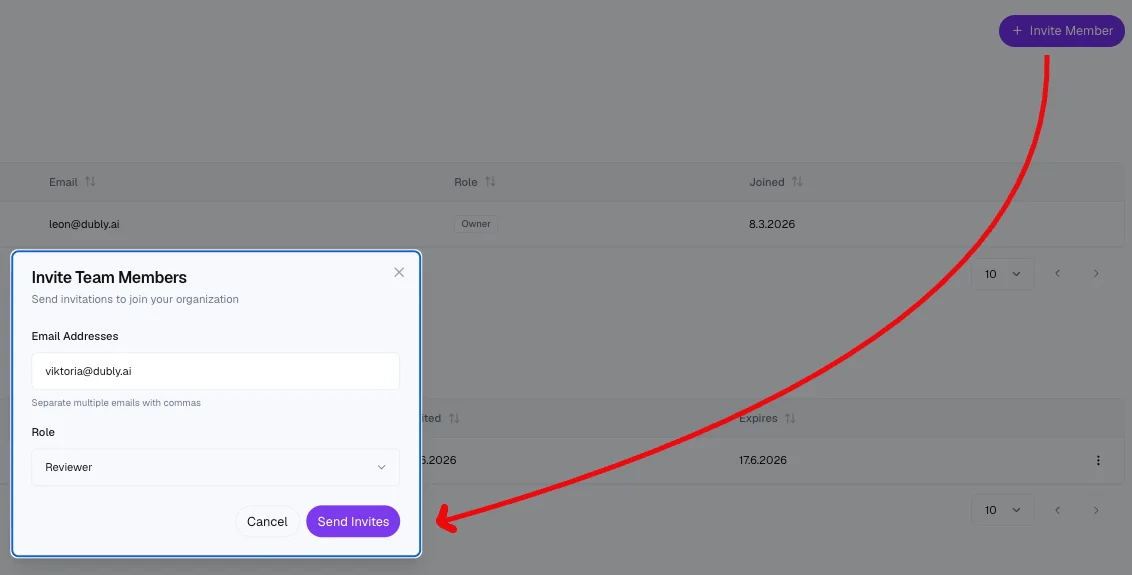
Invite your reviewers
Under Members, invite colleagues from your local markets, external translators, or any native speaker with the Reviewer role. They get their own login and their own profile, so you never share credentials.
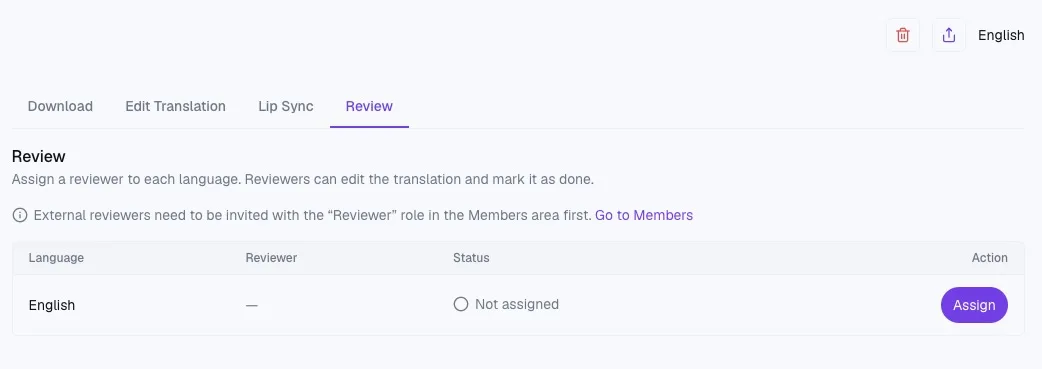
Assign per video and language
On a finished video, the Review tab lists every target language with its reviewer and review status. Assign a reviewer per language and add instructions where useful (please double-check the technical terms). The reviewer automatically receives an email with a direct link, and the language switches to “In review”.
The reviewer corrects and listens
Reviewers work in a reduced workspace built around one job: a review queue with their open reviews first, showing only the videos assigned to them. The detail page contains the translation editor for their language, your instructions, and the video player; the original text stays read-only.
After editing, one click on Update re-renders the language version so they can hear their corrections in place. That step is free, costs no credits, and can be repeated as often as needed.
A clean handoff
When the reviewer completes the review, you get an email telling you whether the version was approved without changes or how many segments changed, and the language gets a check badge right in the language selector. After completion the video disappears from the reviewer's view.
Reassign to start a second round, or unassign at any time. Dubly.AI also blocks removing a reviewer or changing their role while they still have open reviews, so a running review can never end up orphaned.
Safe enough for external reviewers
The Reviewer role is built so you can hand a video to someone outside your company without handing over anything else:
No downloads, no leaks. Reviewers cannot download, delete, share, or upload anything.
Your credits stay yours. Reviewers cannot start lip sync or trigger anything else that costs credits.
Your account stays private. Members, plans, and billing are never visible to reviewers.
No editing conflicts. While a language is in review, only the assigned reviewer can edit it.
Enforced server-side. Every restriction is enforced down to the database level (row-level security), not just hidden in the interface.
And as always: Dubly.AI is a German company, 100% GDPR-compliant, and zero customer data is used for AI training.
2. Long videos run through in one piece
Upload, translate, done. Complete webinars, courses, and trainings of two hours and more no longer need to be split. Behind the scenes, long recordings are divided automatically, transcribed in parallel, and merged back into one consistent transcript, whether you upload a file or paste a link.
3. Lip-sync costs, visible before you start
The number you see is the number that is charged. The Lip Sync tab shows exactly how many credits this specific video will cost before you start it, based on its length. Nothing starts until you actively confirm. No surprises on your credit balance.
4. Lip sync via API
Built for automated workflows. Start lip sync for any target language of a finished dub directly from the API, poll its status, and receive the final lip-synced video URL once it is done. Duplicate requests will not double-charge your account.
5. Sturdier processing behind the scenes
Hand over a long job and walk away. Heavy render jobs now run on new infrastructure. A watchdog catches dubs that get stuck and recovers them automatically, even when a processing step finishes late, and temporary errors such as a busy voice service are retried without you doing anything.
6. Smaller improvements
Move videos between projects. Videos are no longer tied to the project they were created in: every video card now has a “Move to project…” action that files a video into a project later, moves it to another project, or takes it back out, regardless of its status.
Sticky video while editing. While you edit a translation, the video stays visible next to the segment list instead of scrolling away (on desktop).
Every YouTube link works. Playlist URLs, share links, timestamps, Shorts, or mobile links: Dubly.AI resolves the exact video, and the API verifies a video exists before creating a dub and using credits.
More consistent voices. Voices for Hungarian, Norwegian, and Vietnamese are now more consistent, and Norwegian dubs stay in Norwegian (Bokmål) for the entire video, with no drift toward Danish.
Try it on your next video
Upload it in one piece, even at two hours and more
See the lip-sync credit cost before you start
Have a native speaker sign off the translation